<?xml version="1.0" encoding="utf-8"?><feed xmlns="http://www.w3.org/2005/Atom" ><generator uri="https://jekyllrb.com/" version="3.10.0">Jekyll</generator><link href="https://peterqlin.github.io/feed.xml" rel="self" type="application/atom+xml" /><link href="https://peterqlin.github.io/" rel="alternate" type="text/html" /><updated>2026-06-09T17:48:12+00:00</updated><id>https://peterqlin.github.io/feed.xml</id><title type="html">Peter Lin</title><entry><title type="html">The Making Of CourseMap UIUC</title><link href="https://peterqlin.github.io/projects/2025/10/28/the-making-of-coursemap-uiuc.html" rel="alternate" type="text/html" title="The Making Of CourseMap UIUC" /><published>2025-10-28T00:00:00+00:00</published><updated>2025-10-28T00:00:00+00:00</updated><id>https://peterqlin.github.io/projects/2025/10/28/the-making-of-coursemap-uiuc</id><content type="html" xml:base="https://peterqlin.github.io/projects/2025/10/28/the-making-of-coursemap-uiuc.html"><![CDATA[<p>About a month ago, I spontaneously decided to walk over to Temple Hoyne Buell Hall—the architecture building. It wasn’t my first time there—I’ve studied in the atrium several times in the past—but that day I decided to check out what was going on in the lecture hall. I ended up walking into an ancient Greek architecture class, which was kinda cool.</p>

<p>After that little excursion, an idea popped into my head.</p>

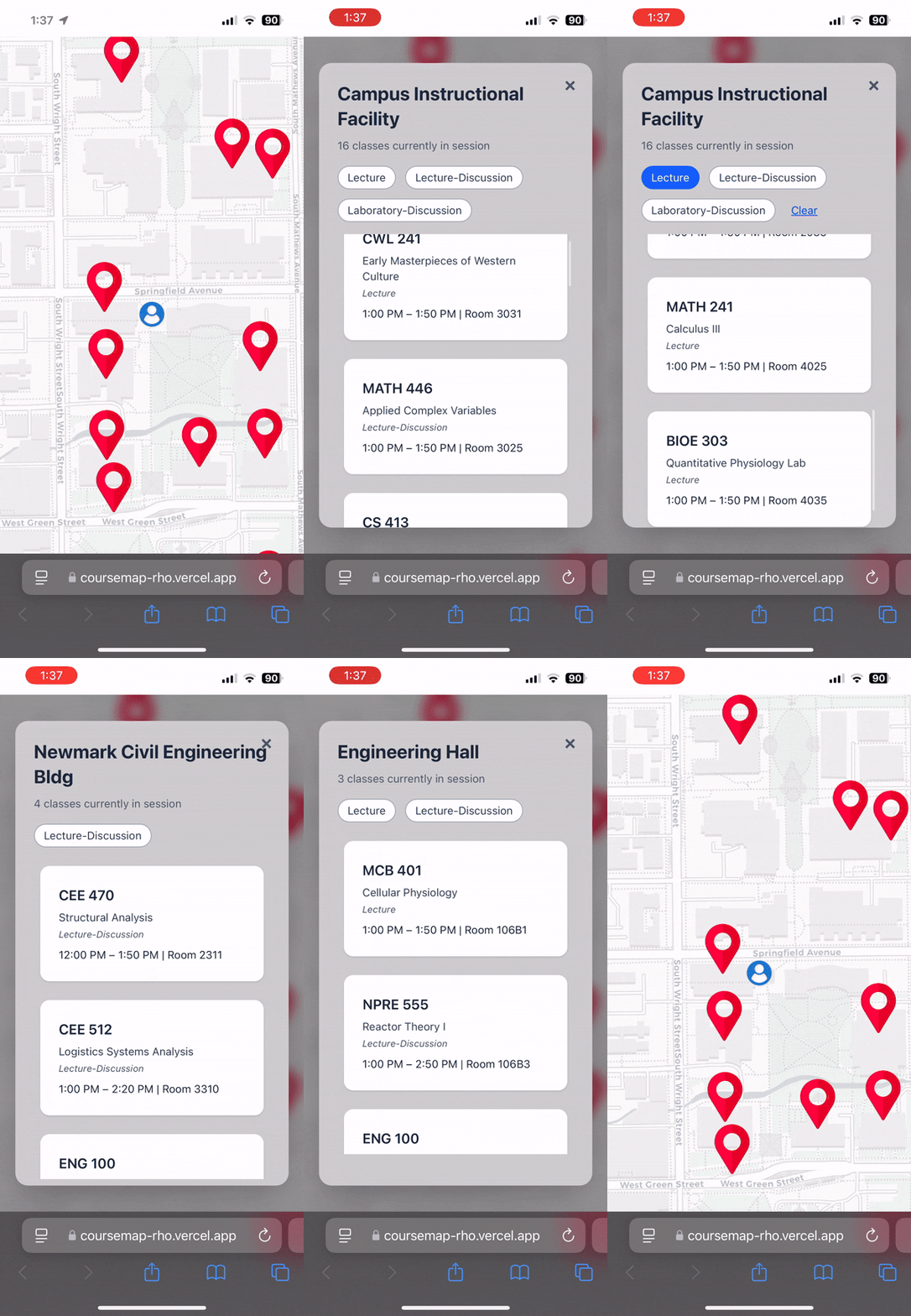
<p>Basically, I’d been wanting to make a database project, since I’d never done the whole create and populate tables from scratch thing before. My idea was to scrape all the courses currently being offered during the Fall 2025 semester, chuck the data into a relational database, and create a real-time map visualization of what classes were going on around you—a “course map” of sorts.</p>

<p>The first step was figuring out where to get the data from; I’ve seen a bunch of “UIUC course this or that” projects before, so I was sure there was a way to get that data. I ended up stumbling across this <a href="https://github.com/shanktt/UIUC-Course-Explorer-Scraper/">github repo</a> that had basically all I needed to get started.</p>

<p>Since I wanted to visualize in real-time which classes were happening, I would need to know more than just what classes were being offered—I needed all the sections of those classes in order to figure out their start and end times. Turns out that the scraper from the repo used the <code class="language-plaintext highlighter-rouge">/schedule</code> and <code class="language-plaintext highlighter-rouge">/catalog</code> directories interchangeably when requesting data from the course explorer, which I didn’t notice at first. Only when I saw a slight inconsistency in the URL when switching between tabs did I realize the difference. I needed to scrape data from <code class="language-plaintext highlighter-rouge">/schedule</code> because that’s where all the course section information was.</p>

<p>Once the scraping URL was figured out, I got to automating it. The first thing to tackle was the course explorer “directory structure”. I use quotes because the main “directory” is really just an XML file that contains links to other XML files, but I’ll just treat it like a folder. Here’s how it’s organized:</p>

<figure class="highlight"><pre><code class="language-markdown" data-lang="markdown">schedule/2025/fall
├─ AAS
├─ ...
├─ CS
│  ├─ 100 (CS Orientation)
│  │  └─ AL1
│  ├─ 101 (Intro Computing)
│  │  ├─ AL1
│  │  ├─ ...
│  │  └─ AYS
│  ├─ ...
│  └─ 598 (Special Topics)
│     ├─ AO2
│     ├─ ...
│     └─ YLL
├─ ...
└─ YDSH</code></pre></figure>

<p>To access every section for every class, we need to do a tree walk through all majors (AAS-YDSH), collecting the sections (AL1, AL2, etc) for each of that major’s classes (100, 200, etc).</p>

<p>I saved a local copy of every XML file that I scraped so I wouldn’t have to repeat the process if something went wrong during scraping, effectively checkpointing my scraping progress based on saved files. This ended up coming in handy when one of my requests was denied, causing my script to skip a class or two. I was able to instantly restart scraping from the skipped classes thanks to the checkpoint.</p>

<p>To prevent this post from dragging out too long, I’ll rapidfire the last couple points I wanted to make.</p>
<ul>
  <li>Database table structure: I decided on three tables: classes, sections, and buildings. Each section references an external class ID and an external building ID.</li>
  <li>Data cleaning: While populating the database, I ran into format errors due to missing section end times, room numbers, and other attributes. For simplicity, I filtered out everything that did not fit my schema. I also filtered out online classes for obvious reasons.</li>
  <li>Visualizing it: My frontend relied on leaflet.js to render course locations, which required each building’s longitude and latitude data. The data I scraped from the course explorer did not contain coordinate information, so I used Geoapify’s Address Autocomplete API to figure out the exact locations for each building I scraped. Again, for simplicity, I deleted any sections with buildings that the API could not locate.</li>
</ul>

<p>After adding some UI components and making the app somewhat presentable, I briefly hosted it with Vercel, Supabase, and Fly.io, and was able to use CourseMap out in the world. Here’s a screen recording I took outside Grainger library.</p>

<p><img src="../../../../assets/coursemap_demo.gif" alt="coursemap demo" /></p>

<p>You can find the source code <a href="https://github.com/peterqlin/coursemap">here</a>.</p>]]></content><author><name></name></author><category term="projects" /><summary type="html"><![CDATA[About a month ago, I spontaneously decided to walk over to Temple Hoyne Buell Hall—the architecture building. It wasn’t my first time there—I’ve studied in the atrium several times in the past—but that day I decided to check out what was going on in the lecture hall. I ended up walking into an ancient Greek architecture class, which was kinda cool.]]></summary></entry><entry><title type="html">Revisiting Animated Cursors</title><link href="https://peterqlin.github.io/stories/2025/10/11/revisiting-animated-cursors.html" rel="alternate" type="text/html" title="Revisiting Animated Cursors" /><published>2025-10-11T00:00:00+00:00</published><updated>2025-10-11T00:00:00+00:00</updated><id>https://peterqlin.github.io/stories/2025/10/11/revisiting-animated-cursors</id><content type="html" xml:base="https://peterqlin.github.io/stories/2025/10/11/revisiting-animated-cursors.html"><![CDATA[<p>About a year and a half ago, I became a little bit obsessed with animated cursors.</p>

<p>I first found out about RealWorld Cursor Editor and the massive online sphere of cursor making (<a href="https://www.rw-designer.com/gallery?search=moving+cursors&amp;by=dls">check it out!</a>) after seeing a classmate using an animated cursor. The sheer amount of creative potential being unleashed within that tiny 32x32 pixel canvas was truly something to behold. As I was browsing, I saw a Terraria slime themed cursor pack, and I instantly knew what I needed to make: Terraria critter cursors. Terraria was a huge part of my childhood, and memories of playing it as a kid have given the game a special place in my heart. Terraria’s pixel-art nature made it an especially good candidate for cursor creation—the small critters would fit really nicely as cursor pets. What made it even better was that I had access to the game’s sprite animations, so all I needed to do was copy them into the cursor editor.</p>

<p>Here are some of my favorites:</p>

<p><img src="../../../../assets/gato.gif" alt="gato" /> <img src="../../../../assets/finch.gif" alt="finch" /> <img src="../../../../assets/gnome_jump.gif" alt="gnome_jump" /> <img src="../../../../assets/gnome_run.gif" alt="gnome_run" /> <img src="../../../../assets/soul_of_might.gif" alt="soul_of_might" /> <img src="../../../../assets/soul_of_sight.gif" alt="soul_of_sight" /> <img src="../../../../assets/jimswings.gif" alt="jimswings" /> <img src="../../../../assets/ladybug.gif" alt="ladybug" /> <img src="../../../../assets/pixie.gif" alt="pixie" /> <img src="../../../../assets/rabbit.gif" alt="rabbit" /> <img src="../../../../assets/skull.gif" alt="skull" /> <img src="../../../../assets/starboard.gif" alt="starboard" /></p>

<p>The process was pretty tedious, involving a lot of cutting up animation frames and pasting them into the editor. I figured that if I was just going to be copying and pasting frames, I could definitely automate the process, but that deserves its own blog post. This post is more of a showcase of some stuff I found pretty cool. Hope you did, too.</p>]]></content><author><name></name></author><category term="stories" /><summary type="html"><![CDATA[About a year and a half ago, I became a little bit obsessed with animated cursors.]]></summary></entry><entry><title type="html">OCaml Game Of Life</title><link href="https://peterqlin.github.io/projects/2025/09/28/ocaml-game-of-life.html" rel="alternate" type="text/html" title="OCaml Game Of Life" /><published>2025-09-28T00:00:00+00:00</published><updated>2025-09-28T00:00:00+00:00</updated><id>https://peterqlin.github.io/projects/2025/09/28/ocaml-game-of-life</id><content type="html" xml:base="https://peterqlin.github.io/projects/2025/09/28/ocaml-game-of-life.html"><![CDATA[<p>This semester I’m taking CS 421, which is “Programming Languages and Compilers,” and the focus of the course is on the functional programming language Ocaml. So far I’ve found the functional programming paradigm to be a nice change of pace; there’s a lot more emphasis on using recursion over while loops for iterative tasks, and a particular kind of recursion called “tail recursion” is preferred since it only requires constant stack space (whereas “non-tail recursion” takes up linear stack space).</p>

<p>Anyways, I wanted to play around with Ocaml on my own and get comfortable with its various features, and, more generally, with functional programming. And in order to do that, I’ll be implementing Conway’s Game Of Life in Ocaml. Any readers unfamiliar with the Game Of Life should take a minute to skim the <a href="https://en.wikipedia.org/wiki/Conway%27s_Game_of_Life">wikipedia page</a>. Essentially, there’s a 2D grid, and we refer to each block in the grid as a cell. Cells can be either alive or dead, and every timestep, a cell will change (or stay the same) based on the aliveness or deadness of its eight surrounding neighbors. The only user input to this game is the initial grid state. Afterwards, the cells act autonomously.</p>

<!-- Before we dive in, a side tangent on coding with LLMs: While, yes, they can write working code sometimes, and yes, they can save you time with the small details, you ultimately still need to have the intuition from learning the basics in order to get anywhere. From a learning perspective, asking an LLM to write your code is like going for a workout and asking the buff dude to do your set for you—the heavy lifting isn't being done by you. Instead, to continue this analogy, you'd be much better off asking the buff dude to correct your form or recommend exercise variants that might suit you better—you leverage his experience and use it to guide your journey. Now, back to our scheduled programming! (pun sooo intended) -->

<p>I’ve never implemented Game Of Life before, so I started by coding in Python, a language I am quite comfortable with. Almost immediately, I ran into a bug—let’s see if you can spot it.</p>

<p>This is a snippet of my Python code, which shows a function that computes the update that should occur given the current state of the 2D grid.</p>

<figure class="highlight"><pre><code class="language-python" data-lang="python"><span class="k">class</span> <span class="nc">GameOfLife</span><span class="p">:</span>
    <span class="p">...</span>

    <span class="k">def</span> <span class="nf">update</span><span class="p">(</span><span class="bp">self</span><span class="p">):</span>
        <span class="c1"># each cell's action is independent of all other cells at every timestep
</span>        <span class="c1"># so we need each cell to have a reference to the previous state
</span>        <span class="n">reference_grid</span> <span class="o">=</span> <span class="bp">self</span><span class="p">.</span><span class="n">grid</span><span class="p">.</span><span class="n">copy</span><span class="p">()</span>
        <span class="k">for</span> <span class="n">x</span> <span class="ow">in</span> <span class="nb">range</span><span class="p">(</span><span class="bp">self</span><span class="p">.</span><span class="n">height</span><span class="p">):</span>
            <span class="k">for</span> <span class="n">y</span> <span class="ow">in</span> <span class="nb">range</span><span class="p">(</span><span class="bp">self</span><span class="p">.</span><span class="n">width</span><span class="p">):</span>
                <span class="c1"># store whether or not the cell is alive
</span>                <span class="n">is_alive</span> <span class="o">=</span> <span class="n">reference_grid</span><span class="p">[</span><span class="n">x</span><span class="p">][</span><span class="n">y</span><span class="p">]</span>
                
                <span class="c1"># count how many neighbors are alive
</span>                <span class="n">alive_neighbors</span> <span class="o">=</span> <span class="bp">self</span><span class="p">.</span><span class="n">get_num_alive_neighbors</span><span class="p">((</span><span class="n">x</span><span class="p">,</span> <span class="n">y</span><span class="p">),</span> <span class="n">reference_grid</span><span class="p">)</span>
                
                <span class="c1"># a living cell with less than two living neighbors or more than 3 living neighbors dies
</span>                <span class="k">if</span> <span class="n">is_alive</span> <span class="ow">and</span> <span class="p">(</span><span class="n">alive_neighbors</span> <span class="o">&lt;</span> <span class="mi">2</span> <span class="ow">or</span> <span class="n">alive_neighbors</span> <span class="o">&gt;</span> <span class="mi">3</span><span class="p">):</span>
                    <span class="bp">self</span><span class="p">.</span><span class="n">grid</span><span class="p">[</span><span class="n">x</span><span class="p">][</span><span class="n">y</span><span class="p">]</span> <span class="o">=</span> <span class="bp">False</span>
                    <span class="k">continue</span>
                
                <span class="c1"># a living cell with 2 or 3 living neighbors stays alive
</span>                <span class="k">if</span> <span class="n">is_alive</span> <span class="ow">and</span> <span class="p">(</span><span class="mi">2</span> <span class="o">&lt;=</span> <span class="n">alive_neighbors</span> <span class="o">&lt;=</span> <span class="mi">3</span><span class="p">):</span>
                    <span class="k">continue</span>
                
                <span class="c1"># a dead cell with exactly 3 living neighbors comes to life
</span>                <span class="k">if</span> <span class="ow">not</span> <span class="n">is_alive</span> <span class="ow">and</span> <span class="n">alive_neighbors</span> <span class="o">==</span> <span class="mi">3</span><span class="p">:</span>
                    <span class="bp">self</span><span class="p">.</span><span class="n">grid</span><span class="p">[</span><span class="n">x</span><span class="p">][</span><span class="n">y</span><span class="p">]</span> <span class="o">=</span> <span class="bp">True</span>
                    <span class="k">continue</span>
                
                <span class="c1"># otherwise, do nothing</span></code></pre></figure>

<p>Did you spot it? Look right below the function declaration, the line with <code class="language-plaintext highlighter-rouge">reference_grid = self.grid.copy()</code>. Basically, I was storing the grid as a 2D array, AKA a 1D array containing other 1D arrays. By using Python’s built-in <code class="language-plaintext highlighter-rouge">list.copy()</code> method, I assumed that I’d be doing a deep copy of the entire 2D array, so that no change I made to the original list would show up in the copied list. However, <code class="language-plaintext highlighter-rouge">list.copy()</code> performs a shallow copy, which creates a copy of the list you provide, but not the items inside that list. Since the items I was storing were <em>lists</em> themselves, which are mutable in Python, I was unwittingly referencing the same contents from the original list in my “copied” list.</p>

<p>There’s nothing like a good bug to drill an important concept into your head. Had an LLM just generated the correct code, I wouldn’t have covered the gap in my knowledge, which is why I’m writing all the code by hand.</p>

<p>A couple hours later, the OCaml implementation is working! Honestly the time spent on this project was probably split 40/60 setting up the local OCaml environment (I tried and failed to get it to work on Windows, but luckily Ubuntu worked) and actually writing out the code. Anyways, it was definitely worth it. I practiced using <code class="language-plaintext highlighter-rouge">Array</code> functions like <code class="language-plaintext highlighter-rouge">fold_left</code> and had fun translating my programming intuition from Python over to OCaml.</p>

<p>Here are some highlights—the <a href="https://github.com/peterqlin/games-of-life">full code</a> is on my Github.</p>

<p>When creating the 2D array to store the grid state, I quickly learned the difference between <code class="language-plaintext highlighter-rouge">Array.make</code> and <code class="language-plaintext highlighter-rouge">Array.init</code>—the former creates an array with copies of whatever initial item you pass in, while the latter calls a function for every element created. For <code class="language-plaintext highlighter-rouge">Array</code>s, this is especially important, as they are mutable.</p>

<figure class="highlight"><pre><code class="language-ocaml" data-lang="ocaml"><span class="k">let</span> <span class="n">init_grid</span> <span class="n">h</span> <span class="n">w</span> <span class="o">=</span> <span class="nn">Array</span><span class="p">.</span><span class="n">make</span> <span class="n">h</span> <span class="p">(</span><span class="nn">Array</span><span class="p">.</span><span class="n">make</span> <span class="n">w</span> <span class="mi">0</span><span class="p">)</span></code></pre></figure>

<p>and</p>

<figure class="highlight"><pre><code class="language-ocaml" data-lang="ocaml"><span class="k">let</span> <span class="n">init_grid</span> <span class="n">h</span> <span class="n">w</span> <span class="o">=</span> <span class="nn">Array</span><span class="p">.</span><span class="n">init</span> <span class="n">h</span> <span class="p">(</span><span class="k">fun</span> <span class="n">_</span> <span class="o">-&gt;</span> <span class="nn">Array</span><span class="p">.</span><span class="n">make</span> <span class="n">w</span> <span class="mi">0</span><span class="p">)</span></code></pre></figure>

<p>have very different behavior, and this reflects the lesson I learned while writing my Python implementation.</p>

<p>At the beginning, I was hesitant to use <code class="language-plaintext highlighter-rouge">Array</code> library functions, instead opting to write out all the details myself. In this snippet, I wrote a function to get the number of alive neighbors of a certain cell.</p>

<figure class="highlight"><pre><code class="language-ocaml" data-lang="ocaml"><span class="k">let</span> <span class="n">get_alive_neighbors</span> <span class="n">cell</span> <span class="o">=</span>
  <span class="k">let</span> <span class="k">rec</span> <span class="n">num_alive</span> <span class="n">neighbors</span> <span class="o">=</span>
    <span class="k">match</span> <span class="n">neighbors</span> <span class="k">with</span>
      <span class="o">|</span> <span class="bp">[]</span> <span class="o">-&gt;</span> <span class="mi">0</span>
      <span class="o">|</span> <span class="n">cell</span><span class="o">::</span><span class="n">cells</span> <span class="o">-&gt;</span> <span class="k">let</span> <span class="n">x</span><span class="o">,</span> <span class="n">y</span> <span class="o">=</span> <span class="n">cell</span> <span class="k">in</span> <span class="k">if</span> <span class="n">grid</span><span class="o">.</span><span class="p">(</span><span class="n">x</span><span class="p">)</span><span class="o">.</span><span class="p">(</span><span class="n">y</span><span class="p">)</span> <span class="o">=</span> <span class="mi">1</span> <span class="k">then</span> <span class="mi">1</span> <span class="o">+</span> <span class="n">num_alive</span> <span class="n">cells</span> <span class="k">else</span> <span class="n">num_alive</span> <span class="n">cells</span>
  <span class="k">in</span> <span class="n">num_alive</span> <span class="p">(</span><span class="n">get_neighboring_cells_wraparound</span> <span class="n">cell</span><span class="p">)</span></code></pre></figure>

<p>I noticed that the same functionality (value-based aggregation) could be achieved with <code class="language-plaintext highlighter-rouge">fold_left</code>, so I revised my initial code.</p>

<figure class="highlight"><pre><code class="language-ocaml" data-lang="ocaml"><span class="k">let</span> <span class="n">get_alive_neighbors</span> <span class="n">cell</span> <span class="o">=</span> <span class="nn">Array</span><span class="p">.</span><span class="n">fold_left</span> <span class="p">(</span><span class="k">fun</span> <span class="n">r</span> <span class="o">-&gt;</span> <span class="k">fun</span> <span class="p">(</span><span class="n">x</span><span class="o">,</span> <span class="n">y</span><span class="p">)</span> <span class="o">-&gt;</span> <span class="k">if</span> <span class="n">grid</span><span class="o">.</span><span class="p">(</span><span class="n">x</span><span class="p">)</span><span class="o">.</span><span class="p">(</span><span class="n">y</span><span class="p">)</span> <span class="o">=</span> <span class="mi">1</span> <span class="k">then</span> <span class="n">r</span> <span class="o">+</span> <span class="mi">1</span> <span class="k">else</span> <span class="n">r</span><span class="p">)</span> <span class="mi">0</span> <span class="p">(</span><span class="n">get_neighboring_cells_wraparound</span> <span class="n">cell</span><span class="p">)</span></code></pre></figure>

<p>By using <code class="language-plaintext highlighter-rouge">fold_left</code>, much of the boilerplate code was removed, allowing me to focus on the core functionality.</p>

<p>One last thing I noticed was that the constraints of functional programming forced me to think differently about how I went about my implementation. In my Python code, I took the easy route and stored an entire copy of the grid every time I needed to make an update. In OCaml, however, it wasn’t obvious to me how I’d be able to replicate what I’d done in Python, and that’s what helped me arrive at a better solution: storing only the cells that need to be toggled instead of the entire grid. This circumvents the issue I had in my Python code, which incrementally updated the grid, necessitating a previous grid to be stored. Now, the cells that need to be toggled are stored without modifying the grid, then the grid is updated all at once, saving a ton of space.</p>

<p>Sometimes the best thing we can do to make progress is to go back to basics.</p>]]></content><author><name></name></author><category term="projects" /><summary type="html"><![CDATA[This semester I’m taking CS 421, which is “Programming Languages and Compilers,” and the focus of the course is on the functional programming language Ocaml. So far I’ve found the functional programming paradigm to be a nice change of pace; there’s a lot more emphasis on using recursion over while loops for iterative tasks, and a particular kind of recursion called “tail recursion” is preferred since it only requires constant stack space (whereas “non-tail recursion” takes up linear stack space).]]></summary></entry><entry><title type="html">Living My Animation Dreams</title><link href="https://peterqlin.github.io/stories/2025/09/26/living-my-animation-dreams.html" rel="alternate" type="text/html" title="Living My Animation Dreams" /><published>2025-09-26T00:00:00+00:00</published><updated>2025-09-26T00:00:00+00:00</updated><id>https://peterqlin.github.io/stories/2025/09/26/living-my-animation-dreams</id><content type="html" xml:base="https://peterqlin.github.io/stories/2025/09/26/living-my-animation-dreams.html"><![CDATA[<p>It seems fitting to start with a childhood story for my first blog post. As a kid, I was obsessed with stop-motion animation. I don’t remember how exactly my obsession started—actually, scratch that, it’s coming back to me now. It all started with this Youtuber, <a href="https://www.youtube.com/@MlCHAELHlCKOXFilms/">Michael Hickox</a>. After watching his videos for the first time as a kid, I was blown away by the way he made stories come to life with Lego. I desperately wanted to make my own animations.</p>

<p>In 2014, when I was ~9 years old, my mom sent me to a summer camp for stop-motion, where I produced my first full-fledged animated film. It’s still on Youtube, if you want to give it a <a href="https://www.youtube.com/watch?v=zU8lnTD6jIY">watch</a> (warning: I had a couple screws loose as a kid).</p>

<p>Anyways, what’s the point of this blog post? I’m going to live my animation dreams, after all, right? What do I even mean by that? In short, I want to relive those pure moments of creative discovery and exploration that I had as a kid. It was easy back then; children are blessed with the gift of unlimited novelty in anything they do. In order to get at that experience, I’ve downloaded an app for 2D animation to see how much creative energy I can release.</p>

<p>I’m going to play around with it see what I can cook up.</p>

<p>Fast forward…</p>

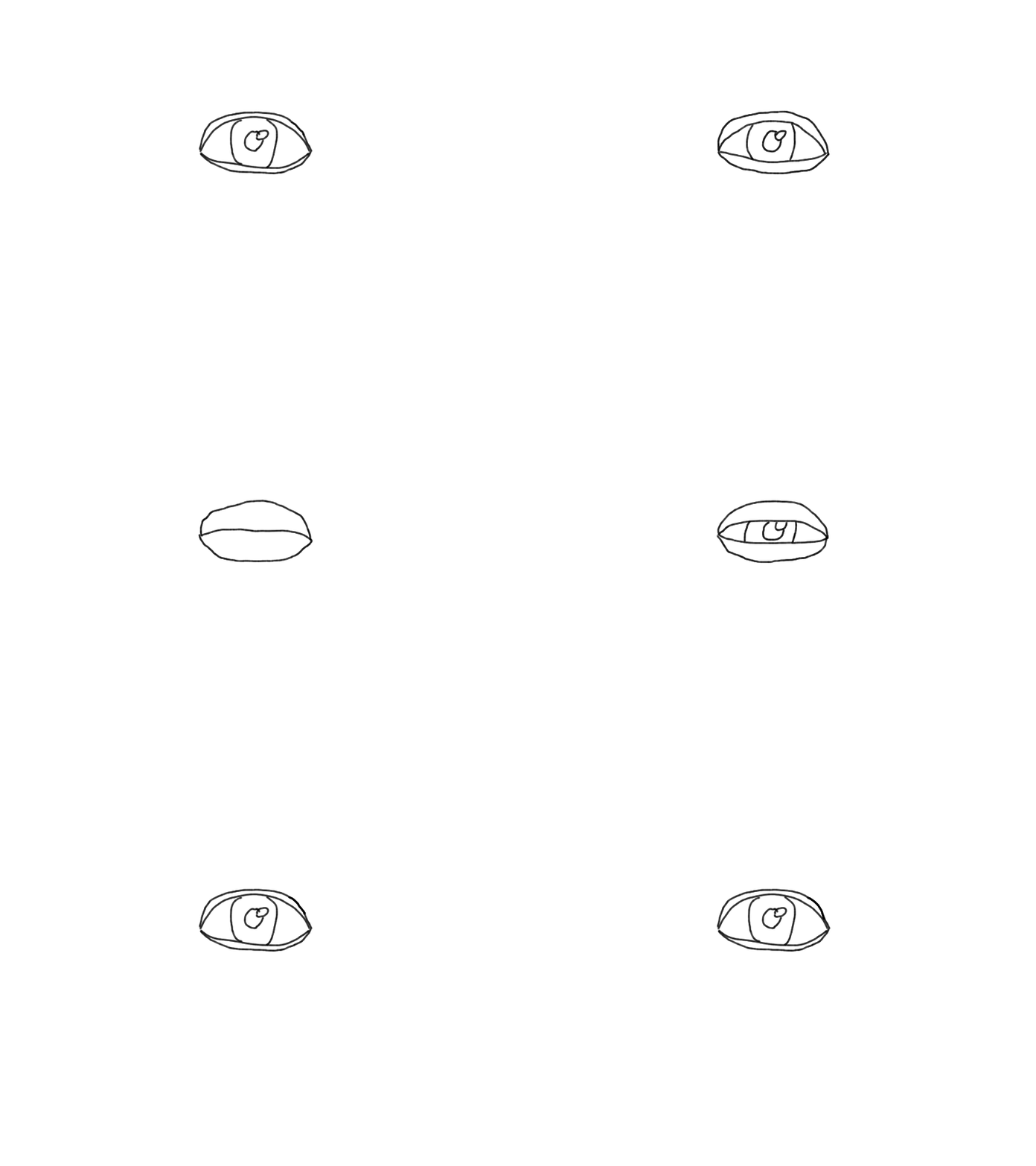
<p><img src="../../../../assets/blink.gif" alt="blinking eye" /></p>

<p>Not too shabby for a first time, but there’s plenty of room for improvement. This was a pretty fun little project, and I’ll post updates if I decide to make more short animations.</p>]]></content><author><name></name></author><category term="stories" /><summary type="html"><![CDATA[It seems fitting to start with a childhood story for my first blog post. As a kid, I was obsessed with stop-motion animation. I don’t remember how exactly my obsession started—actually, scratch that, it’s coming back to me now. It all started with this Youtuber, Michael Hickox. After watching his videos for the first time as a kid, I was blown away by the way he made stories come to life with Lego. I desperately wanted to make my own animations.]]></summary></entry></feed>